

Image sizes on Pinterest 2026
All Pinterest image sizes for 2025 in one infographic
Social networks such as Pinterest are great resources for creative ideas and inspiration. However, Instagram, LinkedIn and the like are constantly changing the specified image sizes and formats, making it sometimes difficult to keep track. We have summarized all the important file formats for Pinterest in a clear infographic and also provided some tricks and tips for you.
Generally, images for Pinterest, the so-called pins, should be created in portrait format. Firstly, the images appear in a larger preview view and secondly, around 80% of the 250 million users currently use the platform on their mobile devices.

What would you like to know about Pinterest image formats?
- The most important facts about Pinterest image sizes at a glance
- Image description with keywords
- What is the right format for Pinterest?
- Infographic
- The current Pinterest image sizes and file formats for 2024
- What added value does Pinterest offer companies?
- Further Pinterest information for companies
The most important facts about Pinterest image sizes at a glance:
Advantages of the 2026 formats: Mobile-first display in portrait format, larger pin heights (up to 2100 px) allow more text/storytelling, WebP support improves loading time & quality
Standard pin: 1000 × 1500 px (aspect ratio 2:3) or as a square pin 1000 x 1000 px
Portrait format or infographic pin: up to 1000 × 2100 px (2.1:1) possible, tip: preferred in the mobile experience
Story/Idea Pin: Image or video size 1080 × 1920 px (9:16)
Pinterest Board Cover: 600x600 px (1:1) or 222 × 150 px (1.5:1) for the thumbnail, we recommend paying attention to a uniform design
Landscape format: 1200 × 900 px (4:3) recommended
Frame format (Pinterest Shop Ads): 1000 × 1500 px (2:3), Story/Idea Ads: 1080 × 1920 px (9:16), tip: mobile portrait formats are delivered more strongly
File formats: WebP, JPG or PNG - PNG better for text/transparent graphics
File size for images: Up to 20MB possible, under 10 MB recommended - < 1 MB for fast loading times
File size for videos: Duration up to 60 seconds in the story segment recommended, MP4 or .mov, file size up to 2 GB
Pay attention to mobile suitability: place important elements in the centre, images also work without zoom
Image description with keywords
The most beautiful Pinterest image with the right aspect ratio is of little use if it is not described with the right keywords. This is because Pinterest works like a search engine for images that requires keywords. The more specific the description is with keywords, the more likely it is that the pin will be found by users who feel addressed by the content.
A brief search before the image description helps to find suitable terms and thus increase the reach of the pin. The terms that Pinterest itself suggests as soon as you start typing a word in the search bar are helpful here. If you confirm the search with Enter, you will also see related topics in colored boxes below the search bar. These also give you an indication of what users are searching for. The pin description can be up to 500 characters long.
No more than two hashtags should be used per image description. Also make sure that the hashtags do not replace any important keywords! The company Lidl could use #lohntsich, but travel bloggers should not use #Reisen as this is an important keyword.
What makes the Pinterest formats 2026 convincing
The current Pinterest formats are clearly orientated towards mobile first: Portrait format pins utilise the full screen area and ensure maximum visibility in the feed. Thanks to larger pin heights of up to 2100 px, there is more space for storytelling, text and visual details. In addition, WebP support improves loading times and image quality - for strong performance and an optimised user experience.
Checklist: These options also continue to apply to standard pins
- The features of Idea Pins and Standard Pins are now available for all types of pins
- All pins can contain links
- Stickers, text, music and more can be added to all pins
- All pins can be edited after publication
What is the right image format for Pinterest?
JPG, PNG, TIFF, BMP, WEBP or GIF? - The file formats JPG, WebP and PNG are suitable for Pinterest. The JPG file format should primarily be used for photos. They are even better than WebP, as the smaller file size has hardly any negative effect on the image quality. However, if you want to put graphics online or if your photos contain text elements, you should choose the PNG format due to its higher quality. The trend towards moving images does not stop at Pinterest - video content is also increasingly being used on Pinterest, just like on Instagram & Co.
The current Pinterest image sizes and file formats for 2026
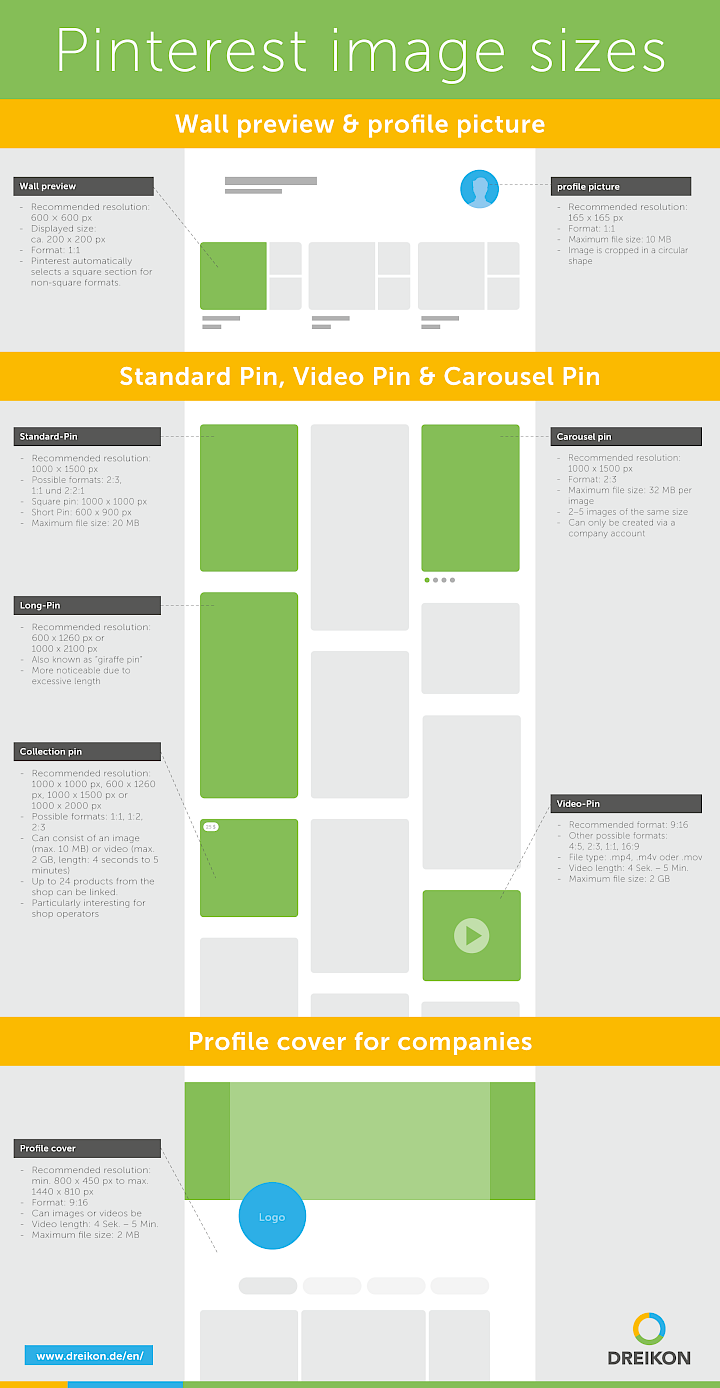
In order to successfully create images or photos on Pinterest, the right image size, image quality and the right image format form the basis. The image file format or file type for Pinterest images and photos should be WebP, JPG or PNG. For videos, file types such as .mp4 or .mov can be uploaded. Different video and image sizes are recommended for Pinterest standard pins, video pins and carousel pins:
Standard pin
For the standard pin, Pinterest recommends an aspect ratio of 2:3 in portrait format (minimum width 1000 px, minimum height 1500 px). However, other formats such as 1:1 or 1:2.1 are also possible and offer enough space for creative content creation.
Story / Idea Pin
For story or idea pins, Pinterest recommends a portrait format of 1080 × 1920 px (9:16) in order to optimise the use of the entire screen area on mobile devices. The supported file formats are JPG or PNG for images and MP4 for videos. The recommended video length is up to 60 seconds per segment, whereby videos can have a size of up to 2 GB. Vertical, mobile-optimised content generally achieves the best visibility.
Carousel pin
In a carousel pin, several standard pins can be strung together in a slideshow. However, carousel pins can currently only be created via a company account. The recommended dimensions here are also 1000 x 1500 px with an aspect ratio of 2:3 and a maximum size of 32 MB per file, but preferably <20 MB.
Pinterest board cover
For the cover image of a Pinterest board, we recommend an image size of 222 × 150 px with an aspect ratio of around 1.5:1. Supported file formats are JPG, PNG and WebP. A standardised and clear cover design ensures a professional overall impression of your profile and strengthens the visual brand impact.
Video pin
It is now also possible to upload video pins with a private account. The vertical format 9:16 is recommended, which completely fills the displays of mobile devices. Although videos of up to 5 minutes in length can be uploaded, concise short videos with a maximum length of 15 seconds are recommended (this applies in particular to advert formats).
Long pin / portrait format for e.g. infographics
Long pins are pins with excess length. Recommended minimum sizes are 600 x 1260 px or 1000 px 2100 px. These pins are often popular as they take up a lot of space on users' pinboards and can therefore attract more attention.
Collection pin
Collection pins display several products in a single pin. They allow companies and retailers to showcase different items from their collection in a visually appealing format. Recommended Pinterest image sizes here are 1000 x 1000 px, 600 x 1260 px, 1000 x 1500 px or 1000 x 2000 px. It is also possible to upload videos.
Pinterest image sizes in the profile
The Pinterest profile picture and the pinboard preview view are displayed in a ratio of 1:1. Please note that the profile photo is automatically cropped in a circle. In addition to the profile photo, company accounts can also upload a title graphic or banner image, which appears as a header in their profile. The Pinterest image size here should be at least 1440 x 810 px to prevent pixelation. Videos of up to 5 minutes in length can now also be uploaded here. The maximum file size is 2 MB.
Pinterest Ads / Sponsored Pins
For standard sponsored pins, Pinterest recommends a format of 1000 × 1500 px (aspect ratio 2:3). Story or Idea Ads should be designed in portrait format 1080 × 1920 px (9:16) in order to utilise the full screen area on mobile devices. The recommended file size for images is less than 20 MB, videos can be up to 2 GB in size. As a general rule, vertical, mobile-optimised formats are preferred and usually achieve better performance.
What added value does Pinterest offer companies?
Pinterest users are specifically inspired by the images shown, plan purchases or activities and are therefore seriously interested in the content offered. This also means: With a company account, you can present your products or services to an audience that is generally interested in your topics. Simple pins or advertisements in the form of videos or carousel pins can reach your target group in a creative way. Since the beginning of 2020, Pinterest has also enabled business accounts to place ads in self-service - similar to Facebook Ads. This allows you to precisely plan the duration and budget of your ads, among other things.
Would you also like to be present with your company on Instagram and Facebook and use the right Pinterest image sizes? Then take a look at our articles on Instagram image sizes and Facebook image sizes.

More Pinterest information for companies
In addition to the right Pinterest image size and the right description with keywords, companies should follow tips and tricks to get the most out of Pinterest. We have therefore compiled some interesting sources for you:
Would you like professional support for your Pinterest account?
Get in touch with our social media expert and arrange a non-binding initial consultation. We look forward to hearing from you!







About the author Matthias Kampmann
Matthias Kampmann is a partner and managing director of the digital agency DREIKON. With over 20 years of experience in search engine optimisation and more than 15 years of expertise in Google Ads, he advises companies strategically on SEO, GEO and sustainable online marketing.