

LinkedIn image sizes 2025
LinkedIn image sizes for posts, post images & articles
With an optimised image size, you can influence the quality of your images on LinkedIn and draw attention to your profile or shared posts. High-quality images and the right image format make your profile look much more professional, regardless of whether it is a private or company profile on LinkedIn. We will show you why it is worth paying attention to the following image sizes.
We are constantly updating the overview of LinkedIn image sizes. If you have any tips, corrections or suggestions regarding LinkedIn image formats, please feel free to contact us via email, Facebook or LinkedIn.
To the short version of "LinkedIn image sizes 2026"
The button takes you to the short version of the blog article "LinkedIn image sizes 2026?". At the end of the summary, you can jump to the beginning of the text if you need more information or would like to download the infographic.

Everything you need to know about the LinkedIn image sizes 2025
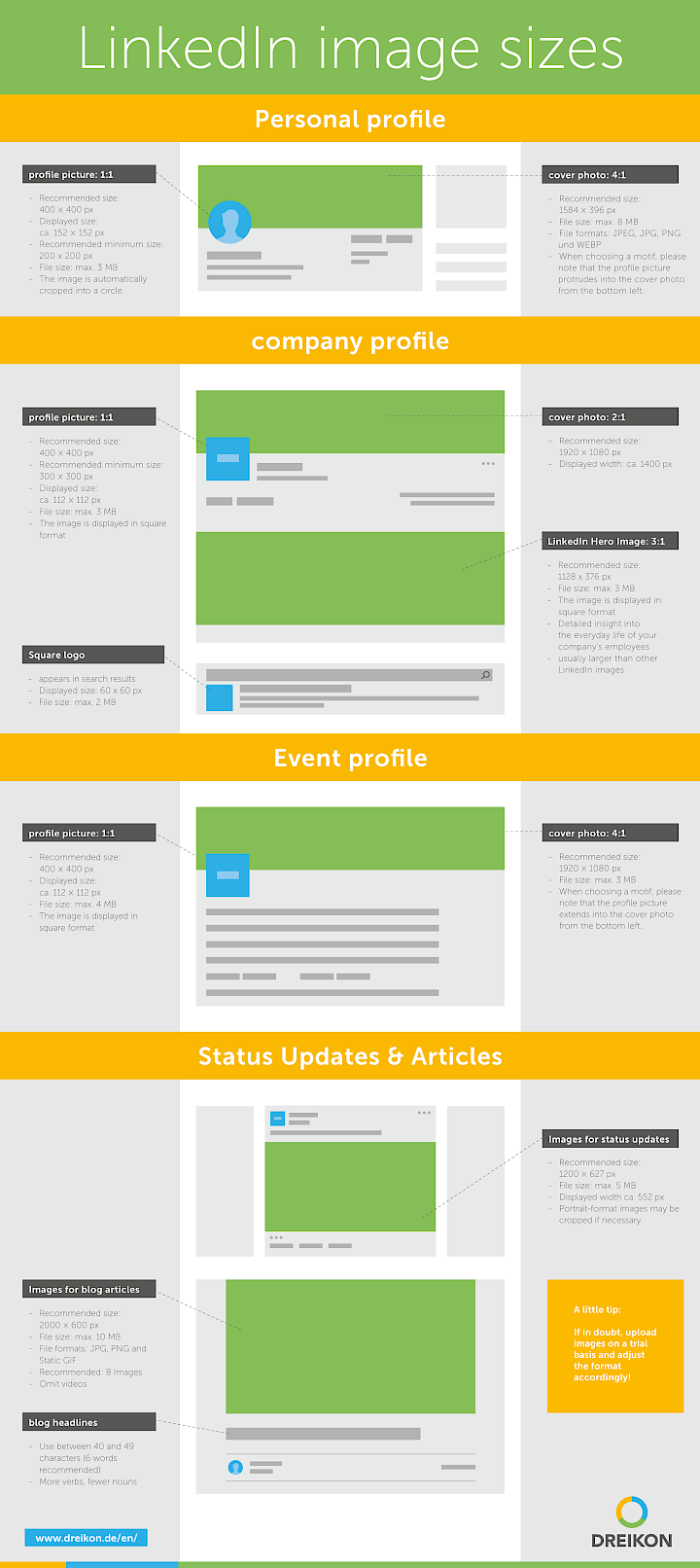
Profile pictures: 400 × 400 px, displayed round
Cover image: 1584 × 396 px, serves as visual brand or topic area, max. 8 MB, max. 8MB, better <3 MB
Feed posts: 1200 × 627 px (between 1.91:1 and 1:1)
Document uploads: recommended format 1080 × 1080 px, square
Other images:
LinkedIn article: 744 × 400 px
Company page banner: 1128 × 191 px
File formats & Co.: JPG or PNG, maximum file size for images: 20 MB, recommended significantly less than 10 MB, optimally < 1 MB
Personal profile on LinkedIn
Profile picture - 400 x 400 pixels - Image size / Image format
The profile photo is also the most important photo on LinkedIn. Whether on your profile page, in posts or in search results - it is always the first thing people will see of you. The minimum size for a profile picture on LinkedIn should be 200 x 200 pixels. However, to ensure good quality, it makes sense to ensure 400 x 400 pixels. The ideal image size for a profile picture is even slightly larger than 400 pixels x 400 pixels. Image files on LinkedIn may also be a maximum of 8 MB. Please note: High-quality images make the profile look much more professional. Before you adjust the image size, it makes sense to consider which group of people you want to address with your profile. Also note that your photo will be cropped as a circle and therefore choose a photo that is suitable for this.
Cover picture - 1584 x 396 pixels - Image size / Image format
The cover or background image is particularly suitable for giving your profile a personal touch. The file size should not exceed 3 MB. The cover picture on your profile offers plenty of space for an appealing picture, which is displayed at the top of your profile page. You should note that the profile photo extends into the cover picture and therefore a picture or image should be chosen that is not covered by the profile picture. The long and narrow dimensions of this image, with an image size of 1584 x 396 pixels, should also be taken into account. For companies it is 1128 × 191 px.
If you have linked a blog or your employer's homepage on your website, but only a grey image is visible, you should make a setting on the corresponding website. This relates to the preview images for social media so that your selected images can be displayed correctly.
Company profile & event profile on LinkedIn
Profile picture - 400 x 400 pixels - Image size / Image format
The profile picture of your company gives an impression of your brand on the platform. It usually contains your logo and should be at least 300 x 300, but preferably 400 x 400 pixels in size. In contrast to a private profile picture, the profile picture is displayed in a square format and appears, for example, when your company appears in a search query.
Cover picture - 1128 x 191 pixels - image size / image format
The cover image is also displayed at the top of the LinkedIn company page and is partially covered by the profile photo. The image size recommended by LinkedIn is 1128 x 191 pixels.
Images for status updates
When you post a status or article, it can be livened up with photos. The best format for this is 1200 x 627 pixels. If you want to use a photo in portrait format, it may be cut off slightly. LinkedIn now also supports 1:1 (1200 × 1200 px) and 4:5 formats, which are displayed larger on mobile devices. The same applies here: It is best to test before you publish the image.
Images for blog articles
Take your time when choosing a good article photo if you want to publish a blog article with an appealing image on LinkedIn Pulse. LinkedIn Pulse is a publishing option provided by LinkedIn itself. The article photo can determine the success of a post, because even in the preview, the image is the first thing that is seen. The image size here is 744 x 400 pixels and should be a maximum of 10 MB. Maximum permitted file size: 20 MB. Permitted file formats are JPG, PNG and Static GIF.

Use of media in the LinkedIn profile
For a meaningful profile that makes you stand out, it makes sense to add photos, links or PDF files to your profile. Depending on where you add these, they will be displayed in different sizes in your profile.
Always use your own photos or image material for LinkedIn for which you have the rights of use. Be it via a photographer or other sites that offer them for sale. You can also use free images for which you do not have to provide photo credits, e.g. from Pixabay or Unsplash - we have prepared an overview of image databases for royalty-free images. When selecting and purchasing images, you should pay direct attention to the image size and file format. This will save you any additional work.
Fancy even more success on LinkedIn?
A perfectly maintained profile or company page on LinkedIn is not enough for you? Do you want to reach your target groups accurately and generate sales and/or leads via LinkedIn? We are happy to support you! Look forward to an initial, no-obligation consultation with our Facebook Ads expert Thomas Jürgens on LinkedIn.
LinkedIn image sizes overview
You are welcome to share the downloaded graphic on LinkedIn image sizes or embed it on your own website. If you use the infographic as content on your website, we would be pleased to receive a link to this blog article as a source.


Short version: LinkedIn image sizes 2026
Personal profile on LinkedIn
Profile picture
Image size: at least 200 x 200 px, ideally slightly larger than 400 x 400 px
File size: maximum 3 MB
Format: circular
Motif: Self-portrait
Cover picture
Image size: 1128 x 191 px
File size: maximum 3 MB
Placement: at the top of the profile page
Motif: appealing picture
- Note: Profile photo protrudes into the cover picture and may cover part of the motif
Company profile & event profile
Profile picture
Image size: 300 x 300 pixels
Motif: usually logo
Format: square
- Placement: e.g. in the display of search queries
Cover picture
Image size: 1128 x 191 pixels
- Placement: at the top of the LinkedIn company page, partially covered by the profile photo
Images for status updates
- Image size: 1200 x 627 px
- Note: Photos in portrait format may be cropped slightly
Images for blog articles
- Image size: 744 x 400 px
- File size: maximum 10 MB
- File formats: JPG, PNG and static GIF
Use of media in the LinkedIn profile
Photos, links or PDF files can be added to a LinkedIn profile. Make sure that you only use your own images or those for which you have the rights of use.
Would you like to find out more about LinkedIn image sizes in 2025 or download them in a clear infographic? Then take a look at the complete blog article.



About the author Matthias Kampmann
Matthias Kampmann is a partner and managing director of the digital agency DREIKON. With over 20 years of experience in search engine optimisation and more than 15 years of expertise in Google Ads, he advises companies strategically on SEO, GEO and sustainable online marketing.